The LB loop

Sell on LB Connect. Ship with Aramex and LibanPost. Get paid with Purpl.

LB Connect
Sell
LB Connect

Your store in the app, open to customers in Lebanon and abroad.

Aramex
Ship in Lebanon
Aramex

Local orders are delivered across Lebanon.

LibanPost
Ship worldwide
LibanPost

Orders from outside Lebanon go out by post.

Purpl
Get paid in Lebanon
Purpl

Your earnings land in your Purpl wallet.

For vendors & brands

Your brand, on every
phone in Lebanon.

A free storefront in the LB Connect app, with the whole chain behind it: Aramex delivers your orders across Lebanon, LibanPost carries them to customers abroad, and your earnings are paid to your Purpl wallet every week. You make it and pack it. LB earns only when you sell.

No listing fees, no monthly fees. 15% commission only when something sells. Sign in at vendor.lbconnectapp.com. New here? The vendor help library walks you through your first product and your first order.

Vendor portal — your products
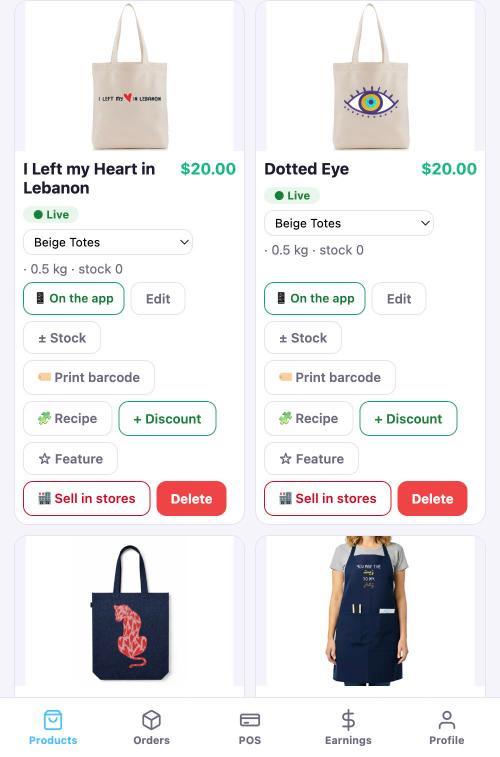
Vendor portal · Products — colours, stock, barcode labels and shelf status per product.
$0To join. No listing or monthly fees
15%Commission — only when something sells
CardCustomers pay securely in the app — no chasing
WeeklyPaid out in Lebanon to your Purpl wallet
One loop, four partners

From your workshop to a customer anywhere, and the money back to you.

You don't need a courier contract, a customs agent or a merchant account. Opening a store on LB Connect connects you to all four.

1 · Sell

LB Connect

  • Your own store page in the app, on iPhone and Android.
  • Customers in Lebanon and abroad pay by card in the app.
  • Orders reach you with a notification in the LB Vendor app.
  • A free register for your counter and shelves in partner stores.
Aramex
2 · Ship in Lebanon

Aramex

  • Orders inside Lebanon are collected from you and delivered to the customer's door.
  • You pack the order; you never arrange a courier.
  • The customer follows the delivery in their app.
LibanPost
3 · Ship worldwide

LibanPost

  • Orders from outside Lebanon travel by air with LibanPost.
  • LB Connect prepares the shipping and customs papers for each order from your product details.
  • You print them and hand the parcel in at LibanPost.
  • The customer pays for the order and the shipping by card before anything is sent.
Purpl
4 · Get paid in Lebanon

Purpl

  • Your share of every sale is added to your balance as soon as it completes.
  • Paid out weekly to your Purpl wallet in Lebanon.
  • Every sale and every payout is in your statement, line by line.
Customer orders→You pack→Aramex or LibanPost delivers→Purpl pays you
How it works

Three steps to your first sale.

1

Open your store

Sign up at vendor.lbconnectapp.com, add your logo and your story, link Instagram, TikTok and your website — they sit on your shop page in the app.

2

Add products

Enter a staple once with all its colours — each colour tracks its own stock and barcode. Publish and it's live. Print labels from the portal or the LB Vendor app.

3

Sell everywhere

Orders arrive with a notification. Flip one switch to place products in partner stores. Ring up walk-ins on your own free register. One catalog, one stock count.

The vendor portal & LB Vendor app

Everything you need to run the brand.

Products, colours, stock — counted once

Each product carries its colours, sizes, cost, retail price, barcode and shelf status. Receive new stock with the ± Stock button (Received or Made), and it's available at the same time in the app, on your register and for partner shelves — one count, no double entry.

  • Any product can be register-only, off the app.
  • One-of-a-kind pieces sell once and retire themselves.
  • Stock corrections carry a reason — never silent edits.
Products in the vendor portal
Products · stock, barcode labels, shelf status

Materials & recipes

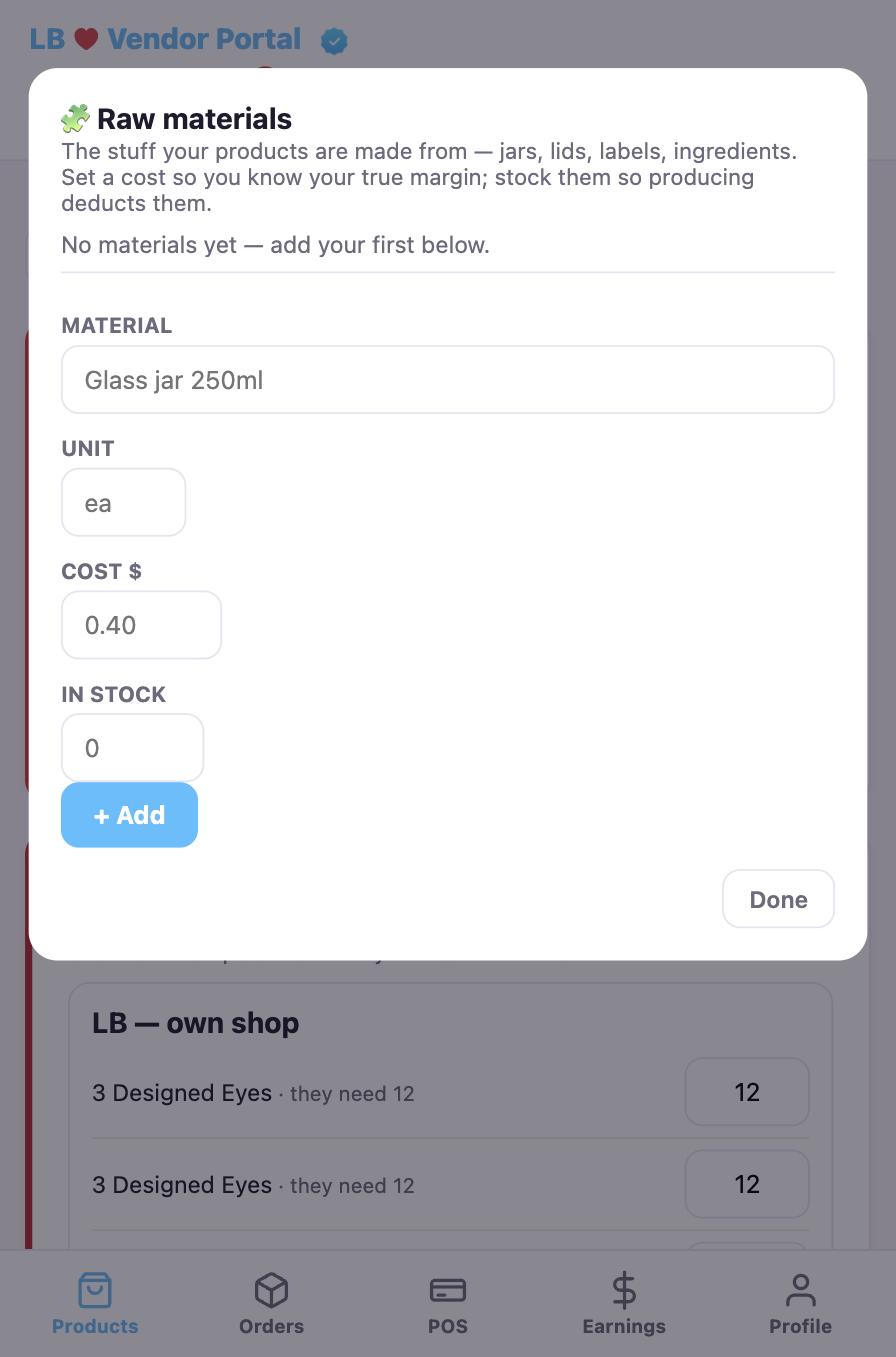
Track your own raw materials — fabric, thread, wax, soap base — and give each product a recipe. When you mark units as Made, the materials are consumed automatically, so you always know what you have left to build.

Materials and recipe in the vendor portal
🧩 Materials · your own component list, separate from the LB catalog

Earnings — app, in-store and your own register

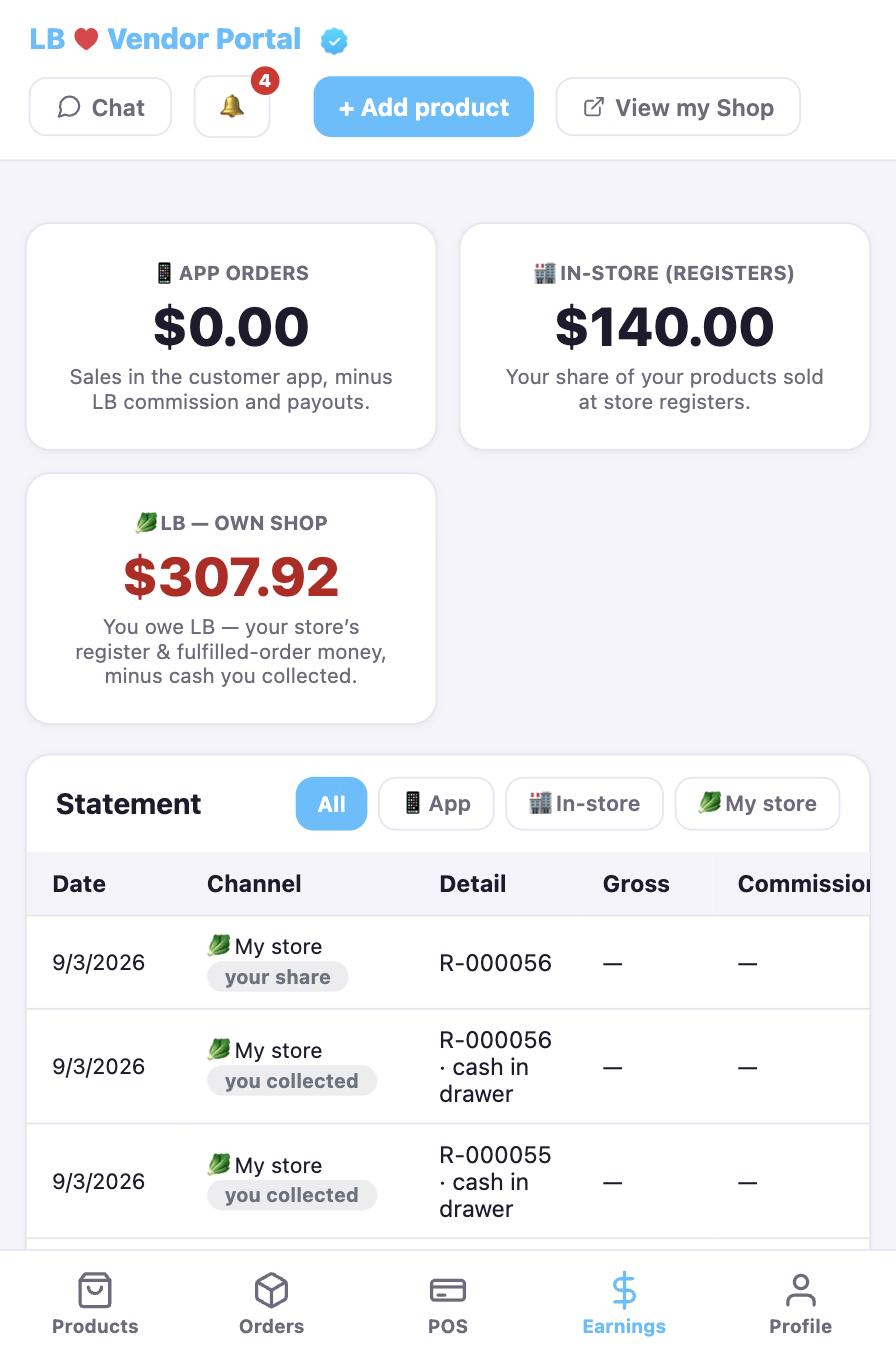
One statement for every channel: what sold in the app, what sold on partner shelves and on your register, LB's commission, the store's share, and what's due to you. Weekly payouts, downloadable statements, and a P&L and balance sheet that read like a story.

  • Commission is computed on the discounted price when a promo runs — everyone scales.
  • Your position with LB: units sent, sold, on shelf, in warehouse, paid.
Earnings tab in the vendor portal
Earnings · App / In-store / My store, unified statement

Promotions & EARN

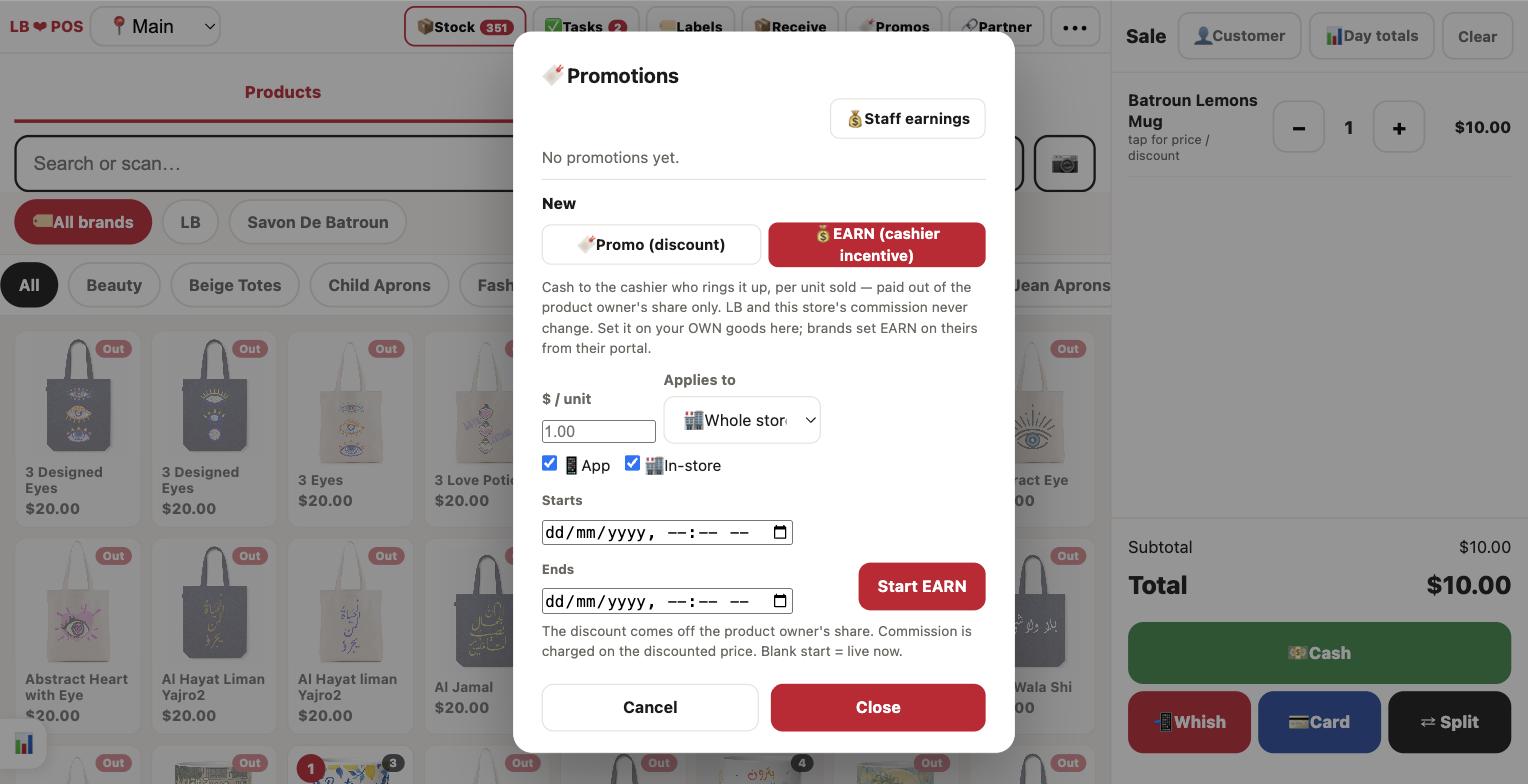
Run a promotion on a product, a brand, a category or your whole store — in the app, in partner stores, or both — with a schedule and a go-live confirmation. Or fund an EARN bonus: a per-unit incentive paid to the cashier who sells your product, taken only from your share, so partner-store staff push your brand.

Promotions with EARN mode
Promos · promo or EARN, channels, schedule

Orders, returns, messages, shelf

Orders come in with a push; pack, ship or hand to LB delivery. Returns follow your policy and refunds go out only after inspection. Chat with customers from the Messages tab. The Shelf tab shows which partner stores carry you, what's low, and what to prep for restock.

Register filtered to a brand
Your products on a partner store's register
Your own counter

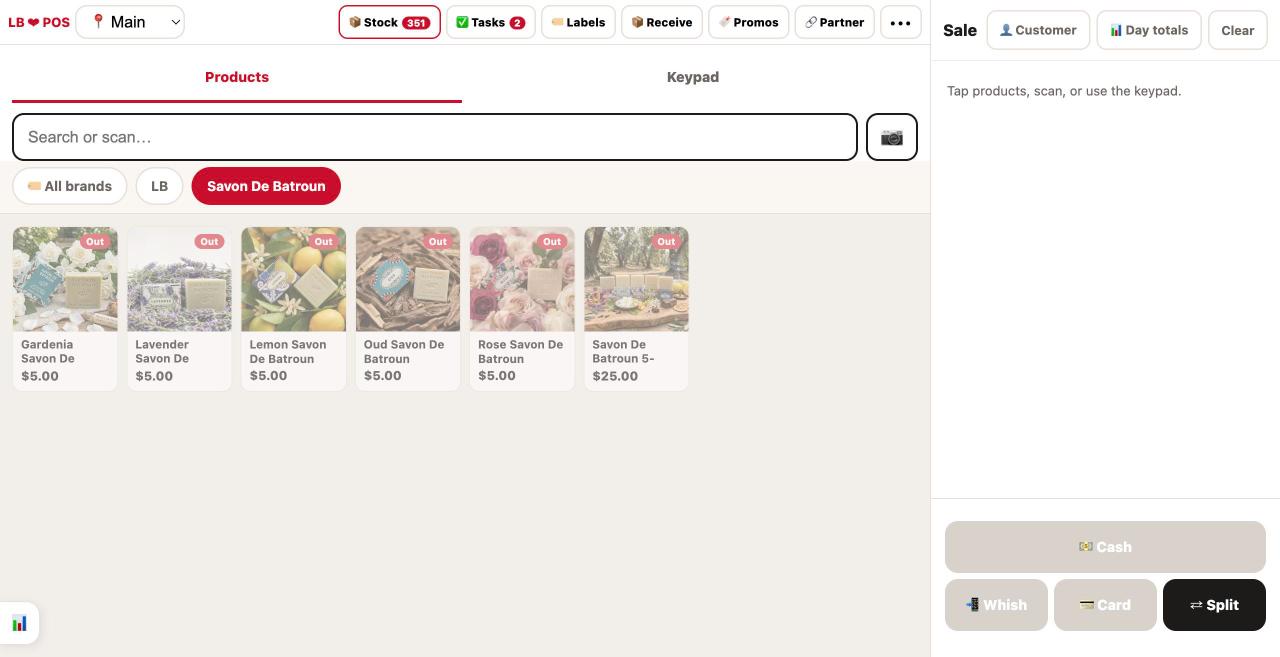
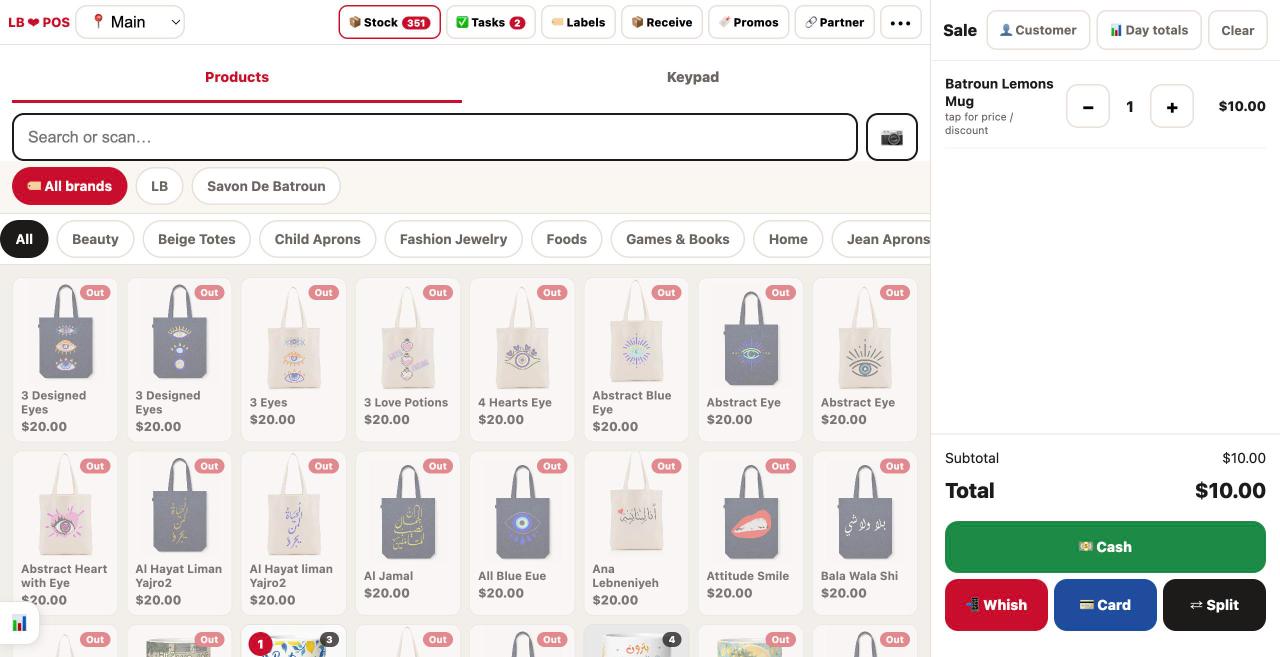
A real register, free.

Full point of sale on any Android tablet, phone or computer: barcode scanner, cash drawer, receipt and label printers, offline mode, staff logins, Z reports. The same register partner stores use.

The LB register
POS · a sale in progress
Common questions

Before you sign up.

What does it cost?

Nothing to join, nothing per month. LB takes 15% when an item sells in the app. For sales on a partner store's shelf, the price is split between you, LB and the store — the standard split is brand 70% / LB 15% / store 15% — and every statement shows the exact shares per sale. When a promotion runs, the split is computed on the discounted price.

Who sets my prices?

You do — always. Partner stores can't change your price; promotions are yours to create and schedule.

How do I get paid?

Customers pay LB Connect by card. Your share of every app order, every shelf sale and every booking is credited to your balance the moment it's complete, and paid out weekly in Lebanon to your Purpl wallet (Whish or a bank account can be arranged) — with a statement that matches the shelf, the register and the app, because they're the same books. Sales at your own counter are yours on the spot. The full fee breakdown is public at lbconnectapp.com/fees.

I own a guesthouse, hotel or apartment — can I list it?

Yes. The same vendor account lists stays, long-term rentals, activities, events and cars, each with its own commission shown in the fee schedule. Guests pay by card in the app; you're paid after check-in. Hotels can sync each room type's calendar by iCal. Property managers can list on behalf of owners with an agreed rate.

Is there a phone app?

Yes — LB Vendor, free on iPhone and Android: products, orders, messages, earnings and your register. On an Android tablet it also drives printers and scanners over USB, so you can print labels, receive stock and run the register. Download it here.

Who delivers my orders in Lebanon?

Aramex. When an order is paid you pack it, and it is collected from you and delivered to the customer. Restaurants and convenience stores deliver nearby orders with local drivers instead.

Can I sell to customers outside Lebanon?

Yes. Orders from abroad are paid by card, including the shipping cost, and travel with LibanPost. LB Connect fills in the shipping and customs papers for each order from the size, weight and description you gave when you added the product; you print them and bring the parcel to LibanPost.

How does two-step verification work?

Turn it on in your profile with any authenticator app. Staff accounts have roles, and every change is logged.


Open your store today.

Ten minutes to your first product. Free until you sell.

Open your store →

Get the LB Vendor app

Run your store from your phone — products, orders, messages and earnings.

App StoreGoogle PlayLearn the app →